Sunday, 10 February 2013

What is Rooting and its Pros and Cons?


Android Root 298x300 What is Rooting and its Pros and Cons?Some of you may be familiar with the word jailbreaking on iPhone, iPad or an iPod. Jailbreaking enables you to download free third party apps, tweak & modify your device or download paid apps for free. On Android although it’s quite different, but Jailbreaking and ‘rooting’ still have the same phenomena.
We know that android is an open source operating system, which means you can manually download apps for free whether they are paid or free without paying a cent or moving a muscle but the question then raised is what would be the benefits of rooting my android if it’s already allowing me to download paid apps for free? Why should I root or jailbreak (or unlock) my Android?
Well the answer to this question is that rooting allows you to have super user permission or be an administrator of Android to completely modify your Android, the way it looks and the way it works. Rooting removes the restrictions that are applied by the manufacturers of device like HTC, Samsung, Sony etc. to keep their devices as stable as possible.
Rooting allows you to use third party apps. Although you can install the third party apps before rooting too but you’ll be kind of limited in using its complete features. For example, an app called Root Explorer can be installed on Android before rooting but you’re limited to using it only as a file explorer but if you root your device, you’ll be allowed to go into the system files/program files from where you can mess up things and do a bit of tweaking, such as deleting stock apps that are taking space in your device’s internal memory or eating your battery life by running in background.

Now What Else Can Rooting Do?

Rooting DOES have a lot of advantages but it also comes with disadvantages which can become a complete headache for some people who are conscious about their device. Let’s have a look at what are pros and cons of rooting an android.

Advantages

Change font of your device
Some devices like LG Optimus series & Samsung Galaxy series come with font changer but still they have kinda limited number of fonts and some devices like the Sony Xperia devices can’t even change the fonts. And while apps that can change fonts be downloaded from Google Play, they are still quite scanty in number. Rooting can give you complete freedom on such small but vital things and apps like Font installer can pull this trick off pretty well.
Overclocking
A lot of you guys won’t be familiar with the term overclocking. The manufacturers use processors which can deliver better performances than they normally give but they intentionally use a stable frequency for the processor so that the device doesn’t get hot (and possibly even catch fire) and for reliability purposes.
This can be changed by using CPU frequency controller apps which can modify the frequency of the processor. For example, the nexus s comes with a processor of 1 GHz but by tweaking it a little bit you can upgrade this speed to 1.1 GHz and even higher.
This will increase the performance of your android device and will deliver better frame rates in games and other processes but would obviously drain the battery quicker. The best app for overclocking is setCPU for root users.
Underclocking
This is the complete opposite of overclocking. Underclocking means to lower the frequency of a processor for example the nexus s has a 1GHz processor, but this can be cut down to 800 MHz or even lower. This would decrease the performance of the device but would save its battery life a lot and will also prevent the device from getting hotter. setCPU for root users comes handy here again.
Upgrade device to the latest version of android
You are probably familiar with this thing that not all devices are updated by their manufacturers. What that means is that you get stuck on an older Android version which is behind the competition by a few iterations but now it is possible for you to upgrade your device to the latest version of the Android OS by rooting.
This is the reason why most people nowadays are rooting their devices because this allows them to use all the new features and looks that are available on the newer versions of Android. There’s a catch though, a real big one: if you don’t know how to upgrade your Android device properly you might even end up getting your phone bricked so I recommend not to try this on your own and get this done by a mobile shop or a specialized person.
Save apps to your SD card
Old or low-end android devices have low amount of internal memory and sometimes the device doesn’t even have the apps to SD feature. By using apps like links2SD andapps2SD you can move applications to your SD card which would save a lot of internal memory.
Gain full access to system files of android
You are not allowed to have access to your android’s system files on the stock, uncustomized ROM but you do gain access to them after rooting so you can tweak them whichever way you want. This feature is also useful to Android developers. The app which can be used for this purpose is called Root explorer.
Delete stock apps from android
Some people don’t want to keep those stock Android apps that come with your phone, which not only use up precious storage but also reduce battery life by running in background. After rooting though, you can delete these otherwise uncustomizeable apps and save internal memory, battery life and RAM. Root explorer is also used here to delete stock apps.
Install/flash custom ROMS
Flashing a custom ROM allows you to install a modified or custom version of android. You can either create your own or use anyone else’s custom rom uploaded on XDA developers or the developers own blog. The custom ROM looks and works a little different because its more modified version than a stock ROM. It might even be using less ram and would have different launchers & settings that don’t come with stock or standard version of android. The app which can be used here is ROM Manager.
Completely backup your data
There are apps that backup your data without rooting but they are a bit limited as they can only backup apps, contacts etc but after rooting, some apps can even perform a complete backup of your data. The app recommended for this purpose is Titanium backup.
Screenshots
One of the biggest features that arrived on Android in Ice Cream Sandwich was the ability to capture screenshots which was impossible in most Android devices running on older OS versions. Rooting gives you the ‘freedom’ of capturing a screenshot and with even more options on how to take them instantly. By using app called screenshot you can take screenshots on your rooted device.
Change boot loading animation
Rooting allows you to download a custom boot animation and use it, so that whenever you would turn on your android device you’ll have a different animation playing on the screen. Apps like boot animations can be used to change the stock boot loading screens.
Block ads
You can remove those ads which popsup when you are using free app with rooting too. For example while playing angry birds free version, an ad appears on the top of screen which sort of interrupts your gameplay. After rooting though, you can remove those ads easily by using Adfree android.
Add true Linux commands to android OS
After rooting, you can use android terminal like the one that Linux has, which you can be used for various commands. Android terminal is a very useful thing for developers. App called android terminal emulator can be used for this purpose.
There are few other benefits too but these are the major reasons why you should root. But rooting comes with disadvantages as well, Which are listed below.

Disadvantages of rooting

End up having a bricked device
Rooting can cause your device to stop working altogether. For those who are not familiar with the term bricking, bricking means to completely hang your device so that it wouldn’t even turn on. The main reasons which can cause bricking is flashing a custom rom because the custom ROMs are sometimes not suitable for your device.
Its not that bad a situation though as in some cases your device is completely restorable. With the passage of time, developers have found many ways of restoring bricked devices and companies like Sony have made a software called PC COMPANION which can restore your bricked Xperia phone but even then, the problem still persists.
Voiding your warranty
I know this sounds really bad but it’s quite true that your android device would be no longer be in warranty if its rooted.

Is Rooting legal? Does Google Allow it?

The answer is yes. Google allows you to root your android devices and they have no problem with it and even after having root permissions you still are, in almost all conditions, allowed to download apps directly from Play Store without any restrictions.
Before rooting your device make sure you have read blogs about your own device because some things may vary while rooting in different android devices. The most popular and reliable software used to get root access on your android currently is SuperOneClick.
Still we recommend having a complete research on how your device would be rooted before proceeding forward because one false step can leave you with an unusable device.
There are also many videos, guides and walk-throughs available from where you can easily consult from.
Happy Rooting!


Saturday, 9 February 2013

The benefits of rooting your Android device


We recently rooted our Samsung Galaxy S3 and discovered a whole new side to Google’s mobile platform. Here are a few points on why you should probably do the same

Whether you’re rocking a SIM-free Android handset or a network-branded device, rooting is definitely something you should be considering.
It’s simple enough to do, even if you’ve never done it before, and it will afford you a type of control over your device that you might not have thought was ever possible.
It also means no more waiting on networks or manufacturers for Android updates. But that’s just the tip of the iceberg. Here, we’ll examine a whole myriad of benefits that are possible once you’ve gained full control over your Android device.
If you're not someone with a technical leaning, some aspects listed below might be outside of your comfort zone. However, it is worth looking at the fullest picture possible in order to best understand why rooting is the only real option for anyone serious about unlocking the true potential of their Android device.

Updates

This is the big one – if you’re sick of waiting on your handset’s network or manufacturer to get their backsides in gear and roll out the latest version of Android, then you’re not alone.
It’s a major problem experienced by nearly all Android users at some stage.
Case in point: Android Jelly Bean, despite being released several months ago, is only present on around two per cent of devices inside Google’s Android kingdom.
Ice Cream Sandwich fares slightly better at 25 per cent but it’s still not up to task, particularly when compared to Apple’s iOS 6 adoption rate.
Rooting your device gets you around this issue to a certain extent by putting you in control of the software that runs on your device. But it’s still not a catch-all solution, and older handsets may struggle to run the latest builds of Android.
That said anything from 2011 and onwards should be able to handle Android 4.x and above, even if networks and manufacturers have written off the idea.

Bloatware

Having full access to your phone’s file system with all the admin rights means you can remove unwanted system applications, also known as bloatware, from your handset.
This level of access allows you to go through your device's system files and delete anything you no longer require. You’ll be amazed by just how much rubbish is packed in there – even more so when you consider the limited memory present on a lot of smartphones.

Ramp up the power 

Rooting a device gives you the ability to overclock its processor. That means you can increase the clock speed of a 1GHz processor, in some cases, to as high as 1.6GHz, for example, which should translate into a pretty significant bump up in processing speed.
Combining overclocking with Custom ROMs can result in massive uplifts in the performance of your handset. We’ve heard reports of a Nexus S running with an overall increased performance of 250 per cent after a series of expertly implemented tweaks.
A bump of 250 per cent, we’d imagine, is rare and requires a lot of skill to achieve, but it does illustrate profoundly just what can be accomplished once your device is rooted.
It’s worth noting that a lot of top level modding such as this requires a very precise set of skill and knowledge, so we would advise anyone not comfortable with the science behind overclocking to proceed with caution. No-one wants to brick their brand new phone, after all. 

Root-only applications

With a rooted device you also get access to plenty of bespoke applications, which can seriously add to the performance and utility of your handset. Here’s a selection of some notable examples: 
  • DroidWall
  • Dual Mount SD Widget
  • Hexamob Recovery Pro
  • Keyboard Manager
  • LEDs Hack
  • Rot Call Blocker
  • Samba Filesharing 
  • Titanium Backup

Custom ROMs

Custom ROMs, much like Sense UI and TouchWiz, are essentially bespoke UIs for Android created by people who aren’t affiliated with Google and its hardware partners.
The emphasis with these is on enhanced usability and performance, rather than marketing and brand differentiation and bloatware. 
When looking into Custom ROMs you’ll want to get one that comes with the latest version of Google’s software but also features plenty of tweaks, performance enhancements, and additional features.
CyanogenMod is popular choice for many as it does all of the above and lots more, as well as giving you intelligent control over your phone’s features and themes. 

Improve Battery Life

A lot of Custom ROMs will improve your battery life via the removal of bloatware and unnecessary applications that hinder performance. There are plenty of power management apps out there, such as Superpower, but most work significantly better when combined with a finely tuned rooted handset. 
Rooting can’t work miracles for your battery life, extending it beyond its natural limits, but it can ensure that you get an extra few hours a day from your device. And sometimes that’s all you really need. 

Modification 

Getting access to exclusive software bundles like HTC’s Beats Audio technology and Samsung’s Siri clone, S-Voice, usually requires that you purchase the latest hero device from said manufacturer. 
With a rooted device this is no longer the case as you’re in charge of what software runs on your phone, not HTC and Samsung.
This means that once a hacker has extracted Beats Audio or S-Voice, a process that usually takes a couple of weeks, and posted it online you’re free to download it and run it on your rooted Android device.

Conclusion

Rooting your device turns you into its owner in the truest sense of the word, as it puts you in charge of every aspect of your phone.
And if that wasn’t enough to persuade you it also takes you out of a normal handset’s lifespan, allowing you to extend the longevity of a device via custom ROMs, tweaks, and up to date patches. 

How to root your Samsung Galaxy S3


If you want to get the very most out of your Samsung Galaxy S3 then you have to be prepared to take the minor risk of rooting it – and we’re here to show you how


One of the main benefits of owning any Android smartphone is flexibility. Android devices offer amazing customisation options and allow savvy users to tailor things so that their smartphone is like an extension of their arm.
The one drawback is that, more often than not, you have to have a rooted phone before you can make any major changes to your device.
Thankfully rooting isn't the arduous, risky business it used to be and we're going to walk you through the very simple steps needed to become a superuser on your device.
[NOTE - Rooting isn't as risky as it once was, but the procedure does still carry risks. Your device may malfunction if the following steps aren't carried out correctly, and it may even stop working altogether. Do bear this in mind before continuing, because we won't be held responsible for any damage to your device.]
First things first:
Make sure that your device is a Samsung GT-i9300 and not one of the many carrier specific devices on the market
To check tap ‘Menu'
Select ‘Settings'
Choose ‘About Device'
You will see an option marked ‘Model Number'
If it doesn't say ‘GT-i9300' or includes supplementary numbers or letters you should do some further research, as this guide - which comes courtesy of the users over at XDA  Developers Forum - may not work for you
Next, before we go into things any deeper, you should make sureyou have version 1.85 of ODIN, Samsung's smartphone software management tool - it can be downloaded from here (forum.xda-developers.com/attachment.php?attachmentid=581913&d=1304094576)
Once the download has completed, install ODIN
You should also grab the CF-Root-SGS3-v6.0 package - it can be grabbed here (http://download.chainfire.eu/185/CF-Root/SGS3/CF-Root-SGS3-v6.0.zip)
After your download completes unzip the file and place the resulting .tar file somewhere memorable, we recommend your desktop
Do not plug your Samsung Galaxy S3 into your computer yet
Open ODIN
Click the button marked ‘PDA'
Choose the .tar file you unzipped earlier
Next, we're going to need to put your Galaxy S3 into download mode, and we achieve this by switching the device off, waiting 10 seconds and then switching it back on again whilst simultaneously holding down ‘Home', ‘Volume Down' and the ‘Power' key
Once you've done that, plug your device into your computer
Before you continue, make sure ‘Repartition' isn't ticked
Click ‘Start'
Wait a moment
Ensure that you do not unplug your device as this may result in damage
Once the procedure is complete your device will be root

Friday, 1 February 2013

CSS exam in Pakistan application process


Candidates, who fall into the eligibility requirements stated above, can apply for the CSS examinations. CSS exam applications will be invited all over Pakistan in the month of November or December every year. Federal Public Service Commission of Pakistan (FPSC) mostly conduct the CSS Exams in month of February every year.
Government employees who fulfill the requirement laid down for appearing in CSS exams are eligible to appear in exams if permitted by the competent authority in their departments or offices. No Government employee shall be competent to apply without the prior permission in writing from his/her department/office as the case may be, and such permissions must accompany the application. Candidates who join Government service after submitting their applications for admission to the examination should also submit the Departmental permission immediately thereafter.
A candidate, who after submitting such Departmental permission, joins Civil Service Academy or is transferred to another Department, should also obtain the permission of that Department and submit the same to the Commission as soon as possible.
A candidate who has left Government service should submit with his/her application the original as well as a copy of his/her discharge/service certificate.
A candidate who has been dismissed from Government or semi Government Service will not be eligible for admission to the examination. If a great number of candidates apply for the CSS so the decision of the authority would be final about the limitation of the candidates to appear in the CSS exams.
If the Federal Public Service Commission of Pakistan (FPSC) imposed a limit and the number of applied candidates exceeds that limit, the commission will select from applicants. This selection will be based on the accurate representation of provinces/areas of Pakistan as well as the various age concessions.

CSS exam in Pakistan introduction


Pakistan is in dire need of intelligent, academically sound and knowledgeable leaders, and political representatives, who can take decisions on behalf of the people, in light of their commendable qualities. As a result the providers of civil services in the country are selected via an examination, now formally known as the Central Superior Services of Pakistan (CSS) which was made binding by the government in the year 1973, under Article 240. The examination tests students on a diverse number of courses, which vary in their content and difficulty level.
Due to the ever increasing scope and popularity of the CSS examination, students belonging to the provinces of Sindh, Khyber Pakhtunkhwa and Balochistan are travelling to the bigger cities to prepare for the cut-throat examinations taking place .

Wednesday, 16 January 2013

Get a user's client IP address in ASP.NET?

We have Request.UserHostAddress to get the IP address in ASP.NET, but this is usually the user's ISP's IP address, not exactly the user's machine IP address who for example clicked a link. How can I get the real IP Address?


Often you will want to know the IP address of someone visiting your website. While ASP.NET has several ways to do this one of the best ways we've seen is by using the "HTTP_X_FORWARDED_FOR" of the ServerVariables collection.
Here's why...
Sometimes your visitors are behind either a proxy server or a router and the standardRequest.UserHostAddress() only captures the IP address of the proxy server or router. When this is the case the user's IP address is then stored in the server variable ("HTTP_X_FORWARDED_FOR").
So what we want to do is first check "HTTP_X_FORWARDED_FOR" and if that is empty we then simply return ServerVariables("REMOTE_ADDR").
While this method is not foolproof, it can lead to better results. Below is the ASP.NET code in C#:
using System;
using System.Net;
 
public class IPNetworking
{
  public static string GetIP4Address()
  {
    string IP4Address = String.Empty;
 
    foreach (IPAddress IPA in Dns.GetHostAddresses(Request.ServerVariables["REMOTE_ADDR"].ToString())))
    {
      if (IPA.AddressFamily.ToString() == "InterNetwork")
      {
        IP4Address = IPA.ToString();
        break;
      }
    }
 
    if (IP4Address != String.Empty)
    {
      return IP4Address;
    }
 
    foreach (IPAddress IPA in Dns.GetHostAddresses(Dns.GetHostName()))
    {
      if (IPA.AddressFamily.ToString() == "InterNetwork")
      {
        IP4Address = IPA.ToString();
        break;
      }
    }
 
    return IP4Address;
  }
}

Tuesday, 15 January 2013

PTA to Remain Chairman-Less for At Least a Month: Sources


Government of Pakistan is likely not to appoint any new chairman for Pakistan Telecommunication Authority for at least one month, told us highly placed sources, who are directly aware of the development.
Chairmanship of PTA was spared yesterday when Mohammad Farooq Awan was removed by a Lahore High Court as his appointment was declared null and void.
Hearing a petition filed by Khawaja Saad Saleem (of Nayatel), that had challenged the appointment of Mr. Farooq Awan as Chairman PTA, Justice Mansoor Ali Shah of Lahore High Court said that appointment was not in accordance to law.
After removal of Mr. Farooq Awan, our source tell, Mr. Nasrul Karim Ghaznavi, member finance, is likely to get administrative charge for running day to day operations at authority. Government will probably wait for a month and half before appointing any regular chairman at PTA.
This can particularly be true because the service term for both the members (finance and technical) is ending next month, while the extension for Dr. Khawar Siddique Khokhar, member Technical, has been disapproved. He is retiring from PTA on February 24th, 2013 after completing four year term. Similarly, Mr. Nasrul Karim Ghaznavi will complete his service term on February 25th, 2013.
As per sources, government has learned from its mistakes and will not directly appoint any chairman this time. Instead it will appoint a member before making him/her the chairman of the authority. Meaning that, government will have to wait for one month to appoint someone the member of the authority.
It merits mentioning here that current members, who are eligible for becoming the chairman, are not in good books of government. Their differences with Raja Parvez Ashraf, the Prime Minister of Pakistan, grew when both the members denied to sign the IM for 3G. It is said that government considers both the members the sole reason for delay in 3G auction.
On other hands, before his removal, Muhammad Farooq Awan had initiated the process for increasing the members’ count at PTA, which has now matured and is supposed to become a policy soon. It is said that government may soon notify to increase PTA’s member count from three to five. Additional members will include: Member Legal and Member Commercial.
In any case, the government must wait till at least one member slot is vacated, until then Mr. Ghaznvi will remain the acting head of authority.
We will of course keep you posted with any developments on this.

Sony Unveils its Flagship Xperia Z Android Smartphone


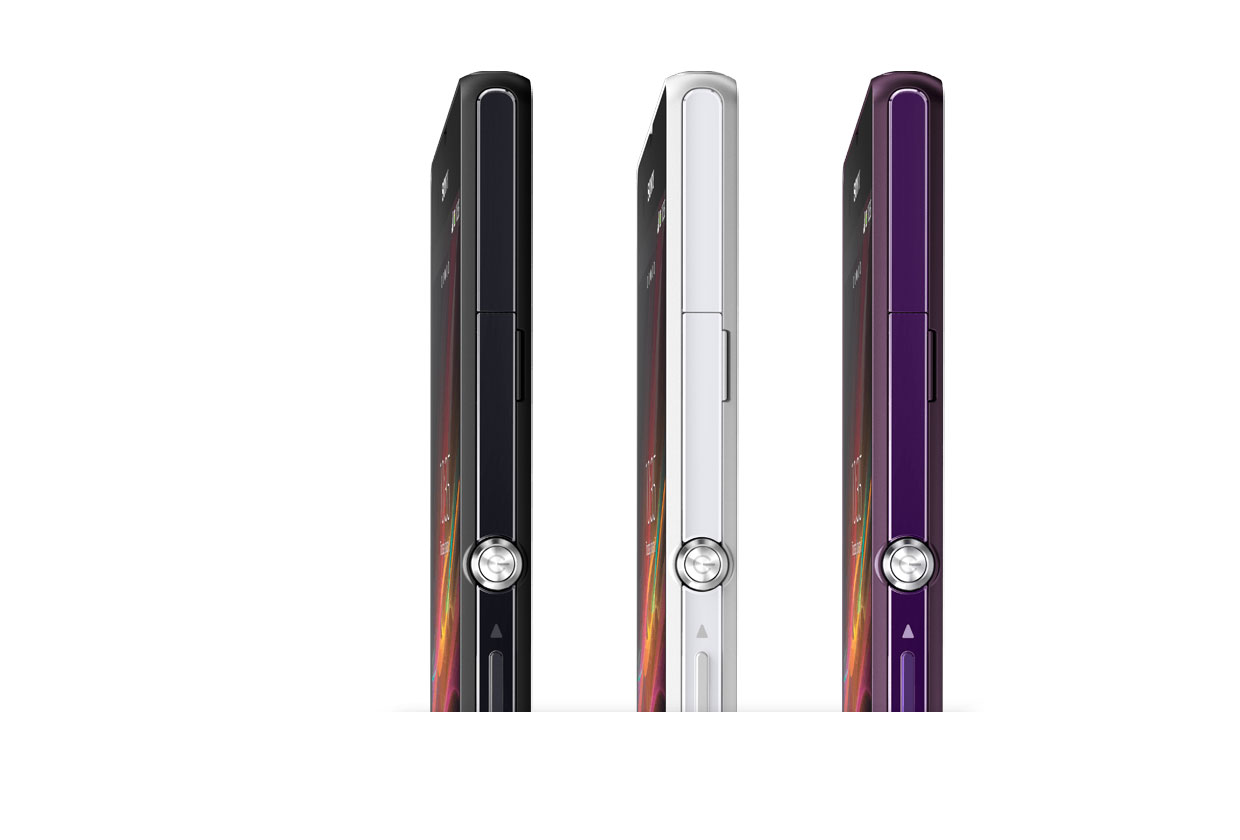
Sony Xperia Z 03 Sony Unveils its Flagship Xperia Z Android Smartphone
Sony unveiled its first quad core Android smartphone, the Sony Xperia Z, at CES 2013, for which it is hoping to give tough time to competition smartphones namely Samsung’s S3 and iPhone 5.
After acquiring the Ericsson part of the company in 2011, the Japanese phone manufacturer is finally into the race with top-notch Android smartphones. Extremely sleek and solid built Sony Xperia Z will run on Android 4.1 Jellybean (planned for upgrade to 4.2) with a Snapdragon™ S4 Pro quad-core processor, promising a super-fast performance and unparalleled graphics.
Sony has put a special emphasis on the design. Company said that Xperia Z design is focused on creating balance and symmetry in all directions, with subtly rounded edges and smooth, reflective surfaces on all sides, which are held together by an innovative skeleton frame. Both the front and back are made of glass, with a reflection coating on the top, bottom and sides.
Sony Xperia Z will sport 5 inch full HD screen and 13 megapixel rear camera plus a 2.2 megapixel front facing camera.
Here are complete specs for Sony Xperia Z:
  • OS: Android OS, v4.1.2 (Jelly Bean), planned upgrade to v4.2 (Jelly Bean)
  • Processor:
      • Qualcomm MDM9215M / APQ8064
      • CPU: Quad-core 1.5 GHz Krait
      • GPU:Adreno 320
  • Design:
    • Dimensions: 5.47 x 2.80 x 0.31 in
    • Weight: 146 g
    • IP57 certified – dust and water resistant
    • Water proof up to 1 meter and 30 minutes
  • Display:
    • TFT capacitive touchscreen, 16M colors
    • Size: 1080 x 1920 pixels, 5.0 inches (~441 ppi pixel density)
    • Sony Mobile BRAVIA Engine 2
  • Memory:
    • Card slot: microSD, up to 32 GB
    • Internal: 16 GB, 2 GB RAM
  • Connectivity: GPRS, EDGE, HSDPA, LTE, Wi-Fi 802.11 b/g/n, Wi-Fi Direct, DLNA, Wi-Fi hotspot, Bluetooth v4.0 with A2DP, NFC, USB
  • Camera:
    • Primary: 13.1 MP, 4128×3096 pixels, autofocus, LED flash
    • Secondary: 2.2 MP
  • Battery:
    • Li-Ion 2330 mAh battery
    • Stand-by: Up to 550 h (2G) / Up to 530 h (3G)
    • Talk time: Up to 11 h (2G) / Up to 14 h (3G)
Sony has said that phone will ship during Q1 of 2013 but no pricing information was made available. It is anticipated that phone will hit stores at around USD 650 (or Rs. 65,000) without subsidies.
Sony also announced a lighter version of Xperia Z, the Sony Xperia ZL, which we will be covering in a seperate post.
 Sony Xperia Z Picture Gallery:

Monday, 7 January 2013

Control your paswords between comptuers and devices

Most people today are using more than just their computer to log into online services making it much harder to manage and store all your passwords between multiple computers, cell phones, and tablets. The service known as Dashlane helps solve this problem by making it easy to store, change, and share all your online passwords between all types of computers, cell phones, and tablets. In addition to managing your passwords the service can also Autofill out any online form, save online electronic receipts, warn you about password vulnerabilities, send you password alerts, generate strong passwords, and much more.
Dashline uses the strongest encryption there is by encrypting all data using AES-256 and only you know the master password since Dashline does not store the master password on any of their servers and not even on your local computer. The master password is also never sent in transmission so it cannot be intercepted by any man-in-the-middle attack. Since the service is a cloud based service, Dashline syncronize your information between computers and devices using a Device Key, which is not related to the master password.


Bonus Tip: Click Tools and then Prefrences. In the Prefrences window click Security and then click Click to unlock settings. Check the "Automatically log out after inactivity" and specify a time. This will log Dashlane out and prevent anyone who has access to your computer from accessing your accounts.

Saturday, 22 December 2012

Why Most IELTS Test Takers Score Below Band 6 - And What YOU Can Do About It

If you must take the IELTS test and this is your first time, or you have failed to reach your target score in IELTS before, please know this:
The latest official report from the IELTS Organization showed that test takers from the top 40 countries scored on average below Band 6 (in Academic and General Training tests).
At the same time most universities want you to score 7 or above - and most immigration laws require band 6.5 or higher.
But how can you beat the average? Is it possible?
Yes, it is definitely possible. You CAN beat the statistics and easily get Band 7, Band 8 - or even Band 9.
IF you're willing to listen.
From: Simone Braverman
Founder of IELTS-Blog.com

December 23, 2012.
Dear Friend,
Any successful IELTS test-taker knows that ...
...there is NO magic way of getting a great score in the exam.
Here is the formula: Your success depends on one thing only - the way you solve the tasks. The way you answer the questions and write your reports and essays. And people, who know the right way, get higher scores. But people who don't - score average or below.
It's really that simple.
Good news is that anyone can learn the right way quickly and easily. Even better news is that in one moment you could have access to it.
You are literally one click away from a book that is GUARANTEED to help you maximize your IELTS score. It helped thousands of students to score higher in IELTS, and it WILL help you - that's a promise.
This book is 100% GUARANTEED to maximize your IELTS score and transform your exam preparation from chaotic and frustrating to systematic, productive and enjoyable.
Between you and me, does this sound familiar?
You must get a high score in IELTS, and have no idea how to do it.
Writing a good essay is hard, because you don't have enough ideas and they take long to generate. By the time you have something to write about, there is not enough time left to finish your writing. You have trouble expressing your thoughts and the sentences come out just wrong.
Graphs are difficult to describe because you have trouble analysing them (well, you're not a scientist, are you?), and no matter how much you try, any report is taking longer than 20 minutes.
How do I know this? Because I've been there, too.
I know what it's like to always run out of time in the Reading test, because the passages are hard to understand and the questions are confusing. I know what it feels like to be a slow reader and always lose time, or concentration, especially if the texts are long.
I, too, felt the frustration of losing points on grammar, because there is no time to check your answers. I understand the desperation of not being able to achieve you target Band score, no matter what you do.
Just like you, I used to get nervous while speaking, worried about my grammar or pronunciation, and was desperately looking for the right word to say. You are not the only one whose English is often misunderstood by people, and who is convinced that unless there is someone to practice in speaking with, they will never get better.
It's not just you, whose mind goes blank when you need to speak on a topic for 2 minutes, who's left with no ideas what to say or with no words in their vocabulary.
And it's not just you who panics in the Listening section, when they go too fast, or speak with an accent, or because it's hard to concentrate and you're afraid to miss the answers.
If any of this describes your IELTS preparation, I've got great news for you:
I've Had It All. And I Know How To Help.
You are about to be given a step-by-step guide to IELTS preparation, that will transform your studying from frustrating, labour-intensive, long, boring and hopeless experience into an effective, focused and a much shorter one.
At any step you will know exactly what you're doing and why, your confidence will grow quickly because of the results you will be getting, and you won’t be just studying - you will be preparing to maximize your IELTS score.
Even if you're working 8am to 6pm, even if you're a student and have other exams to worry about, and even if raising a family takes away almost all of your waking hours - this guide will help you fit IELTS preparation in any of your busy days.
And when you do take the IELTS exam, prepare to be surprised by your score - it might be higher than you expected.
If I showed you other people, just like you, who are doing exactly what you want...
Would you at least believe it is possible for you?
Just some of the people whose lives my advice changed forever:
Total band: 7.5 (yehey!)
"Hi Simone,

As I promised I am informing you about the result of my IELTS exam.

Listening: 8
Reading: 8
Writing: 7
Speaking: 7
Total band: 7.5 (yehey!)

Thanks again for everything that I have learned."

- Ann (Canada)

I needed a 7 and I've got it!

Hi Simone,

These below were my results. I needed a 7 and I've got it! I am really happy!

Listening 8
Reading 7.5
Writing 6
Speaking 7.5
Overall Band 7.5

Thank you so much for the preparation!

- Paula, Brazil
...Fantastic news: my band score is 8!

I thought I would contact you to share the fantastic news I received this morning. I took the IELTS Academic test in London and I have just received my result. My overall band score is 8!

For the preparation I accessed materials on your blog and used your book Target Band 7. I believe that without your help I would not be able to achieve such great result. Thank you ever so much.

Kind regards,
- Nora (United Kingdom)
Now I can enroll in university and further my nursing education

Your tips and book are a huge part of my success.

I got total band score of 7. I got all 7 in reading, listening and writing. My speaking is band score is 7.5. Now I can enroll in university and further my nursing education here in Australia.

I remember it was only 3 weeks before my test and I asked for your help. I was scared then and thought I would not make it in the test. The book explained everything clearly. Writing task became easy after I read your book. Every detail was being discussed. Thank you very much!


Copyright @ 2013 PakTechClub.